+33-9-7266-3068
 contact@gdm-pixel.fr








Most React Native guides stop the moment it “works on the emulator”. The problem is that in production — on a real phone, with iOS aggressively managing memory and Android varying by manufacturer — your background tasks stop. Silently. Without any log. Without any visible error.
Result: data synchronization that no longer happens, notifications that don’t arrive, fetch that fails after 3 days of use. And a user who uninstalls.
Here’s what 15 years of building web and mobile applications taught us — and what the official documentation doesn’t document enough.
Why Background Tasks Really Fail (And It’s Not Your Code)
The first mistake most developers make: looking for the bug in their code. Often, the code is correct. It’s the operating system working against you.
iOS and Android have radically opposed philosophies on background process management. iOS is draconian: the application has no guarantee of execution outside of windows explicitly granted by the system. Android is theoretically more permissive, but manufacturer overlays (Samsung, Xiaomi, Huawei) add their own battery optimization layers that kill processes without warning.
What we concretely see with our clients developing React Native apps:
- A
BackgroundFetchtask that works in development, but stops after 72 hours in production on iOS - A background geolocation service that stops as soon as a Xiaomi user activates “energy saving mode”
- Workers that run perfectly on a Pixel (pure Android), but die on a Galaxy S24
The React Native documentation mentions these constraints. It doesn’t tell you how to work around them robustly.
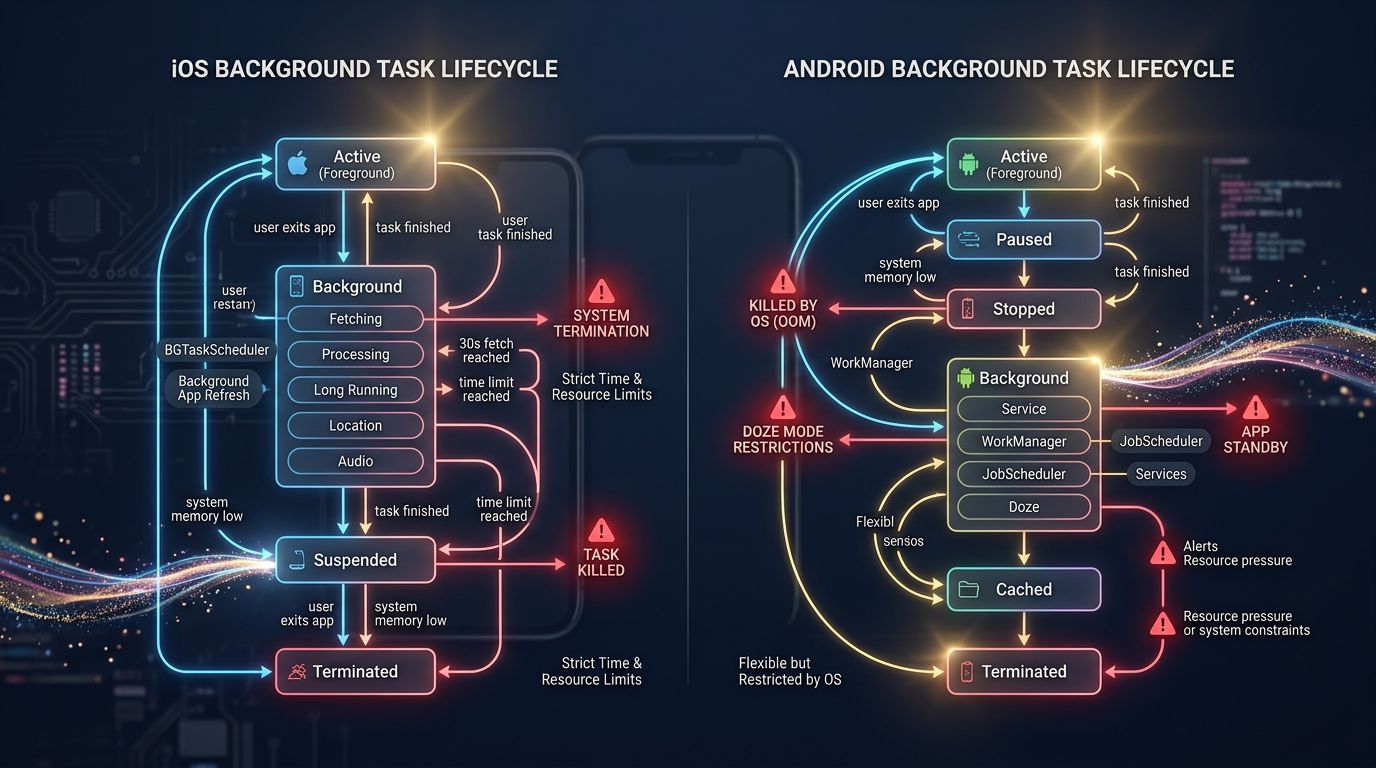
The Three Approaches — And Why Two Will Disappoint You
BackgroundFetch: Useful, but Limited
react-native-background-fetch is the most documented solution. It works on iOS and Android, it’s simple to set up, and it will give you false hope.
On iOS, the minimum interval is 15 minutes — and that’s a suggestion, not a guarantee. The system decides when to run the task based on app usage history, battery level, and network connection. In practice, your tasks run between 15 minutes and several hours after the scheduled time.
This is not a bug. This is iOS’s documented behavior.
For non-critical synchronizations (content updates, data prefetching), this is acceptable. For anything that needs to be punctual — payments, alerts, stock updates — it’s insufficient.
Headless JS Tasks on Android: Powerful, Fragile
Android allows via HeadlessJS running JavaScript even when the app is in the background. This is more reliable than BackgroundFetch on “pure” Android devices. The problem comes with manufacturer overlays.
Here’s what agencies never tell you: Xiaomi, Oppo and Huawei phones represent a significant share of the market. And all these manufacturers have battery management systems that kill background processes, unless the user manually goes into settings to uncheck “battery optimization” for your app.
How many users do that? Very few.
Silent Push Notifications: The Real Solution for Real-Time
If your need is to trigger a specific action at a specific time, stop fighting against background task limitations. Use silent push notifications.
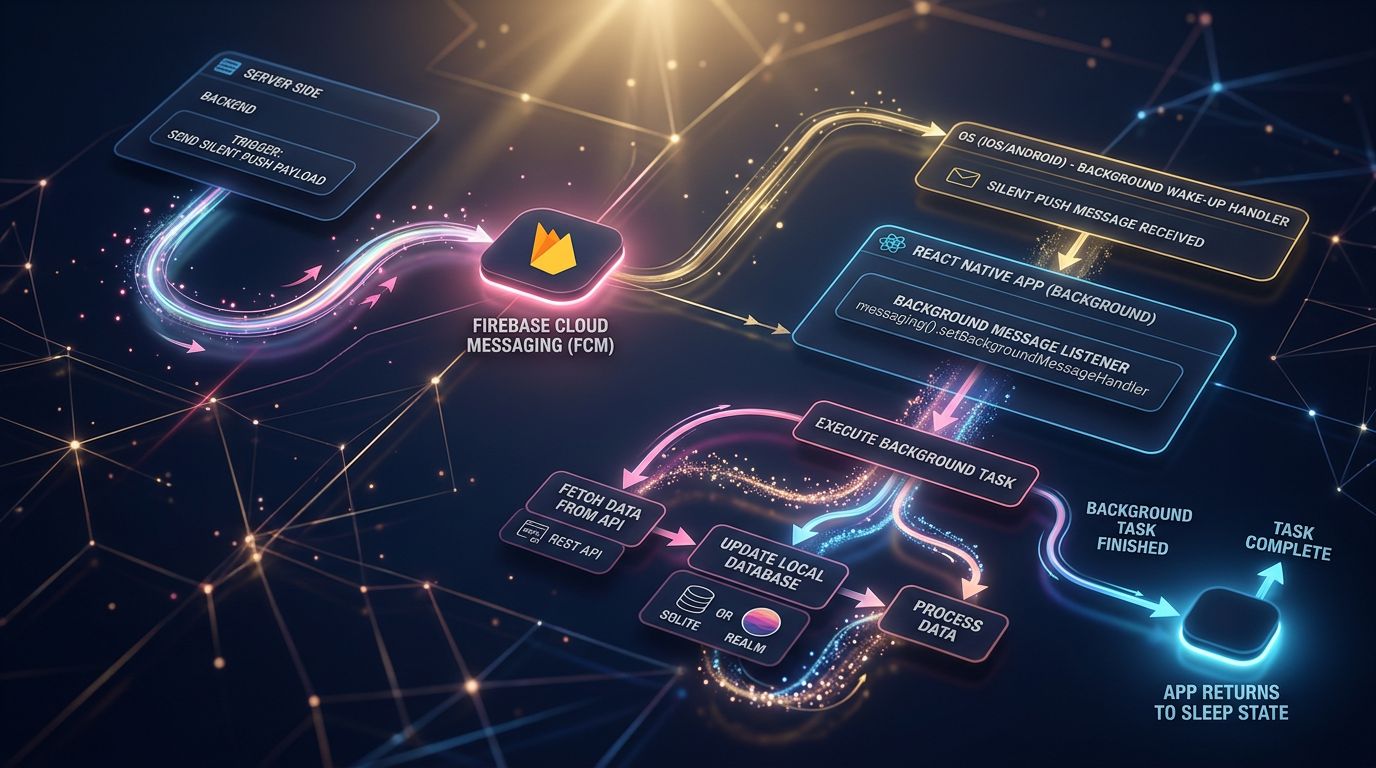
The principle: your server sends a push notification with no visible content (silent push notification). The app wakes up, executes its task, goes back to sleep. iOS guarantees 30 seconds of execution. Android is more generous.
This is the architecture used by WhatsApp, Slack, and most critical apps. Not because it’s elegant — because it works in production.
The Stack That Actually Works in Production
After testing several approaches on real projects, here’s what we recommend based on use case.
For non-critical periodic synchronization (content updates, stats, logs): Use react-native-background-fetch with a retry strategy. Never assume the task executed. Check server-side, and re-sync on app open if needed.
For server-triggered actions (notifications, critical data updates): Silent push notifications via Firebase Cloud Messaging (FCM) on Android, APNs on iOS. Always test on real devices, not just on simulators.
For continuous geolocation: react-native-background-geolocation from Transistor Software is the reference. It’s paid (around $400/year for a commercial app). It’s also the only lib that properly handles iOS/Android edge cases in production. If your app depends on geolocation, this is an investment, not a cost.
“The reliability of a mobile app is measured by what happens when no one is watching — when the screen is off, battery at 15%, and the user in a weak signal area.” — A principle we apply systematically in mobile audits
Configuration Mistakes That Cost Dearly
Here’s where things get interesting — and where most projects go off the rails.
Forgetting iOS Capabilities
On iOS, each type of background task must be declared in Info.plist and enabled in Xcode Capabilities. Background Fetch, Remote Notifications, Background Processing — if you forget one of these flags, the task runs in development (where restrictions are relaxed) and fails in production.
This is one of the most frequent causes of “it worked before going to production”.
Ignoring Doze Mode and App Standby on Android
Android 6+ introduces “Doze Mode”: when the device is inactive, background jobs are grouped and deferred. Android 8+ adds even stricter restrictions on background services.
The official solution: use WorkManager via a native lib. react-native-background-fetch does this under the hood since version 4. If you’re using an older version or an unmaintained lib, you’re exposed.
Check your dependencies. A quick npm outdated can reveal surprises.
Not Handling Timeouts
iOS gives you 30 seconds. Android is variable. If your task exceeds this limit — slow network fetch, heavy processing, sluggish SQLite database — the system kills it. Without exception. Without a clean log.
The rule: every background task must have an explicit timeout. If it hasn’t finished in 25 seconds, it must terminate cleanly on its own, save its state, and resume at the next cycle.
Testing Under Real Conditions: The Protocol We Use
Emulators don’t reproduce background behaviors. Period. You must test on real devices, with real constraints.
Our minimum protocol before shipping a background processing feature:
Device 1 — Pure Android: A Pixel or Android One device. Validates that your code works without manufacturer overlay.
Device 2 — Samsung Galaxy: Tests behavior with the Samsung overlay, which is the most widespread.
Device 3 — iPhone with recent iOS: Validates Apple restrictions, which evolve with each major version.
For each device, the test scenario:
- Launch the app, put it in the background
- Turn off the screen, wait 30 minutes
- Check if the task executed
- Repeat with battery below 20%
- Repeat with energy saving mode activated
It’s tedious. It’s what separates an app that holds up in production from one that generates support tickets at 3am.

The Resilience Strategy: Never Assume the Task Executed
Here’s the most important mindset shift: design your app as if background tasks might never execute.
This implies:
A foreground sync as fallback. On every app open, check if data needs to be synchronized. If the background task failed, the foreground catches up.
A last-execution timestamp. Store locally when the task last ran. If the delay is abnormal, trigger an immediate resync.
Server-side indicators. Don’t trust the client alone. Your server must know if a device is “behind” and adapt its responses accordingly.
This isn’t over-engineering. It’s what all critical mobile apps do. Gmail, Notion, Slack — all have a foreground catch-up logic because they all know background processing isn’t 100% reliable.
“A robust system isn’t one that never fails. It’s one that recovers on its own.”
What This Means Concretely for Your Project
If you’re developing a React Native app with background processing needs, here are the three actionable points to remember:
1. Choose your stack based on your actual use case, not based on the first Medium tutorial you read. BackgroundFetch for non-critical, silent push for real-time, specialized libs for geolocation.
2. Test on real devices, with real constraints. Emulator = false security. A Samsung in energy saving mode will reveal more bugs in 30 minutes than 10 hours on a simulator.
3. Design for failure. Your background task will fail. Not always, not on every device, but it will fail. Your architecture must anticipate this.
Conclusion: Reliability Is Built, Not Assumed
Background processing in React Native is not a code problem. It’s an architecture, configuration, and real-conditions testing problem.
Basic tutorials show you how to run a task. They don’t show you how to run a task reliably, on all devices, for 18 months of production. That’s where the difference lies between an app users keep and an app they uninstall.
At GDM-Pixel, when we intervene in a mobile app audit that “doesn’t work like before”, background tasks are among the first three things we check. Because we know that’s where silent bugs live.
Your React Native app has erratic behavior in production? We do mobile technical audits — honest diagnosis, actionable recommendations, without selling you a rewrite if it’s not necessary. Contact us to discuss it.

,w_550,c_fit,co_white/fl_layer_apply,fl_no_overflow,g_west,x_90,y_150/c_fill,w_795,h_445,g_auto/f_webp/q_auto/v1/nova-refonte-site-web-vraiment-necessaire-erreur-couteuse?_a=BBGMR9LB0)