+33-9-7266-3068
 contact@gdm-pixel.fr







 TL;DR - Key Takeaways at a Glance
Your Site Runs. So Everything’s Fine?
A client called us one Thursday morning. Their e-commerce site had been down for 72 hours. Three days of lost sales. The cause? A plugin update that had crashed silently overnight, with no alerts, no recent backup, and no one monitoring it. Their previous agency had sold them a “turnkey site.” Maintenance? “We’ll see if you need it.”
They needed it.
We encounter this scenario several times a year. Business owners who thought that once their site was live, it ran itself. Like a car that never needs an oil change.
Here’s what nobody really explains about website maintenance—and what it actually costs you to ignore it.
What “Website Maintenance” Really Means
The term is vague. Every agency defines it differently. So let’s establish the basics.
Website maintenance covers three distinct realities, often conflated.
Corrective Maintenance
This is the most visible. Something breaks—contact form stops working, page displays incorrectly on mobile, random 500 errors appear. We step in and fix it. Reactive, not anticipated.
The problem: when something breaks, you often discover it by accident. Or through an embarrassed customer message. Meanwhile, Google may have already crawled your error page. Your SEO takes a silent hit.
Preventive Maintenance
CMS updates (WordPress, PrestaShop), plugin updates, backup verification, availability monitoring, SSL certificate checks. It’s invisible when it works. It’s catastrophic when it doesn’t.
A WordPress site not updated for 6 months is an active target for bots scanning for known vulnerabilities continuously. Not a matter of luck—a matter of probability.
Evolutionary Maintenance
Your site must evolve with your business. New service, new GDPR regulation, price changes, new page addition, optimization of an underperforming landing page. It’s not a complete redesign—it’s intelligent maintenance.
Most maintenance contracts only cover the first two components. The third is often where your site’s real commercial performance is determined.

The Real Consequences of an Unmaintained Site
Let’s be direct about the numbers.
A site that goes down loses between 2.5% and 5% of its monthly revenue if the incident lasts more than 24 hours—according to Gartner data on the cost of service interruptions. For an online store generating €20,000 per month, that’s €500 to €1,000 lost per day of downtime.
But the most insidious impact is on SEO.
Google monitors your site’s availability. Prolonged outages, consistently slow pages, accumulated 404 errors—all of this gradually degrades your rankings. You won’t notice it that week. You’ll realize it three months later when your incoming calls have dropped 30%.
“Website security is not a state, it’s an ongoing process.” This principle, applied by security agencies to critical systems, applies equally to your website.
And then there’s the legal risk. GDPR imposes obligations on personal data protection. An insecure contact form, non-compliant cookie banner, data breach—the fine can far exceed what you saved by avoiding a maintenance contract.
What You Really Pay When You “Pay Nothing”
Many SME owners tell us the same thing: “My site is online, I have no problems, why would I pay for maintenance?”
The question flips easily. How much is your time worth when you have to call a developer in emergency on a Friday evening? How much value does a customer gain seeing a security warning in their browser when they visit your site?
Here’s what “paying nothing” actually includes:
The cost of emergency interventions is systematically higher than a monthly contract. A freelance developer called in an emergency charges €150 to €300 per hour. A 4-hour intervention to restore a hacked site easily costs €800 to €1,200—with no guarantee of success if backups are missing or outdated.
The cost of lost time is rarely calculated. You spend two hours finding the right contact, explaining the problem, waiting for diagnosis. These two hours don’t appear on the developer’s invoice—they appear on your calendar.
The cost to your reputation doesn’t show up in euros. A potential customer who arrives at your site and finds an error page probably won’t come back. They’ll go to your competitor. Without telling you.

What a Good Maintenance Contract Must Include
Not an exhaustive list here—just the non-negotiable points you must verify before signing anything.
Automated and Tested Backups
Daily backups are the minimum. But a backup that’s never been tested for restoration is a backup you don’t know works. Ask your provider: “When did you last test a restoration?” If the answer is vague, that’s a red flag.
Availability Monitoring
Your site must be monitored 24/7. Not by a human—by an automated tool that alerts you (and your provider) as soon as an anomaly is detected. Tools like UptimeRobot or Better Uptime allow monitoring at 1-5 minute intervals. If your contract doesn’t mention monitoring, you’re flying blind.
Controlled Updates
Updating WordPress or PrestaShop without protocol is playing Russian roulette. A good contract provides: backup before update, testing in a staging environment, validation before production deployment. This isn’t luxury—it’s basic rigor.
Guaranteed Response Time (SLA)
How long does your provider take to respond to an outage? 4 hours? 24 hours? 72 hours? If it’s not written in the contract, it’s not guaranteed. For an e-commerce site, an SLA of 4 hours during business hours is the minimum acceptable.
Maintenance and SEO: The Link Everyone Forgets
Here’s what we see concretely in our audits: sites that lost 40-60% of organic traffic not because of a Google penalty, but because of accumulated technical issues never addressed.
Slow pages because images were never optimized. Broken internal links creating dead ends for Google’s bots. Expired SSL certificate scaring away browsers. Duplicate content appearing after a botched migration.
None of these problems is dramatic. Together, they slowly suffocate your visibility.
According to a Semrush study, sites performing regular technical audits maintain on average 23% more ranking positions compared to unmaintained sites.
Technical maintenance and SEO are not two separate subjects. One conditions the other.
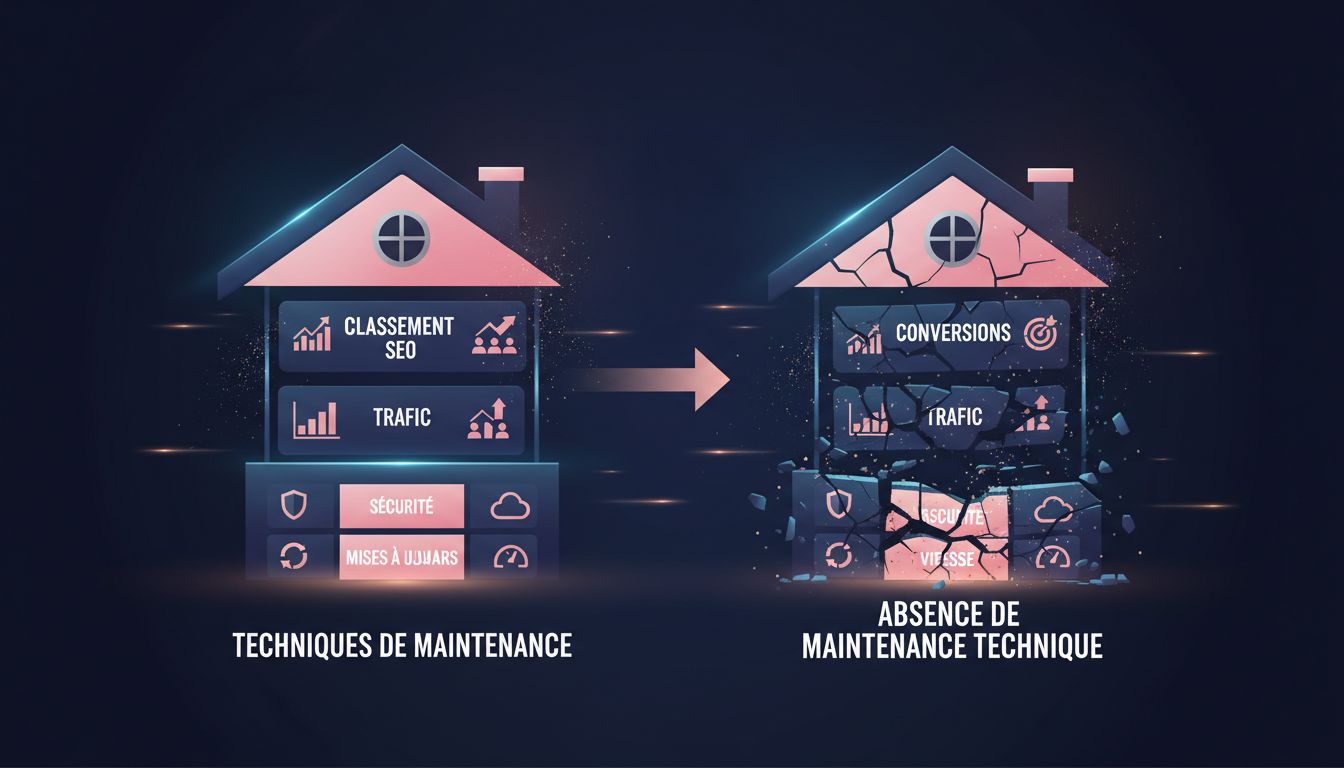
If you’ve invested in SEO content, blog articles, a site redesign—all of it erodes if the technical foundation isn’t maintained. It’s like building a new house on cracking foundations.
What We Do Concretely at GDM-Pixel
We won’t sell you a maintenance contract by explaining that we “carefully monitor your site.” Here’s what it means in practice in our workflow.
Our sites are monitored with real-time Discord alerts. When a client site goes down, we’re notified before the client is. We’ve implemented daily backups with 30-day rotation and monthly restoration testing. Updates systematically pass through a staging environment before touching production.
For our e-commerce clients’ PrestaShop sites, we’ve automated weekly performance checks—loading time, Core Web Vitals, crawl errors. A synthetic report goes to the client each month. Not a 40-page incomprehensible report—a 5-line summary with priority actions.
That’s useful maintenance. Not an opaque cost center—a measurable safety net.
Three Questions to Ask Right Now
Before moving forward, ask yourself these questions about your current situation:
When was your site last backed up? And if your site went down in 10 minutes, would you know how to restore it, and how long would it take?
Has your site been updated in the last 3 months? If you’re on WordPress or PrestaShop and the answer is no, your site is probably vulnerable to publicly documented and exploited flaws.
Who do you call if your site goes down on a Saturday at 8 PM? If you don’t have the answer immediately, you don’t have a continuity plan.
These three questions aren’t meant to scare you. They’re meant to help you concretely measure your level of exposure.
Maintenance is a Management Decision—Not a Technical Option
A website is a business asset. It generates leads, sales, credibility. Like any asset, it depreciates without maintenance.
The real question isn’t “do I need a maintenance contract?” The question is: “What risk am I willing to accept for my business?”
If your site generates zero leads and zero sales, maybe the risk is acceptable. But if your site is a real business channel—if clients find you via Google, if you receive requests through forms, if you sell online—then neglecting maintenance is a deliberate financial risk.
Want to know where your site stands? We conduct technical audits with no commitment, providing an honest diagnosis: what works, what needs attention, what’s a priority. No unnecessary redesign sales. Contact GDM-Pixel—we respond within 24 hours.
 Social networks
  Analyze with AI