+33-9-7266-3068
 contact@gdm-pixel.fr








 TL;DR - Key Takeaways at a Glance
What AI cannot replace in a web experience
A client called us a few months ago. His web application — a business platform for managing field teams — crashed whenever the 4G connection weakened. Data loss. User frustration. Massive abandonment. He had invested in a beautiful design, a solid backend, and smooth animations.
What he didn’t have was an architecture designed for the real world.
The real world is the technician in a basement with no signal. It’s the sales rep in a dead zone who still needs to fill in his order form. It’s the tradesperson on the move who cannot wait for the page to reload.
And that is where two topics, rarely addressed together, become inseparable: local-first architecture and human UX strategy. One without the other produces an application that works in the lab but fails in the field.
What is local-first architecture, concretely?
The principle is straightforward to explain, but structurally demanding to implement.
A classic application operates in server-first mode: every user action triggers a request to a remote server. No connection? No response. The user waits, or worse, loses their data.
Local-first is the opposite.
Data lives first on the user’s device. The application operates fully in offline mode. Synchronisation with the server happens in the background, when a connection is available. And if two users modify the same piece of data simultaneously? The system resolves the conflict automatically, via CRDT (Conflict-free Replicated Data Type) algorithms.
This is not a new technology. Notion, Linear, Figma — the tools tech teams use every day — are built on these principles. What is new is that this architecture is becoming accessible for standard business applications, thanks to libraries like ElectricSQL, PouchDB, or Automerge.
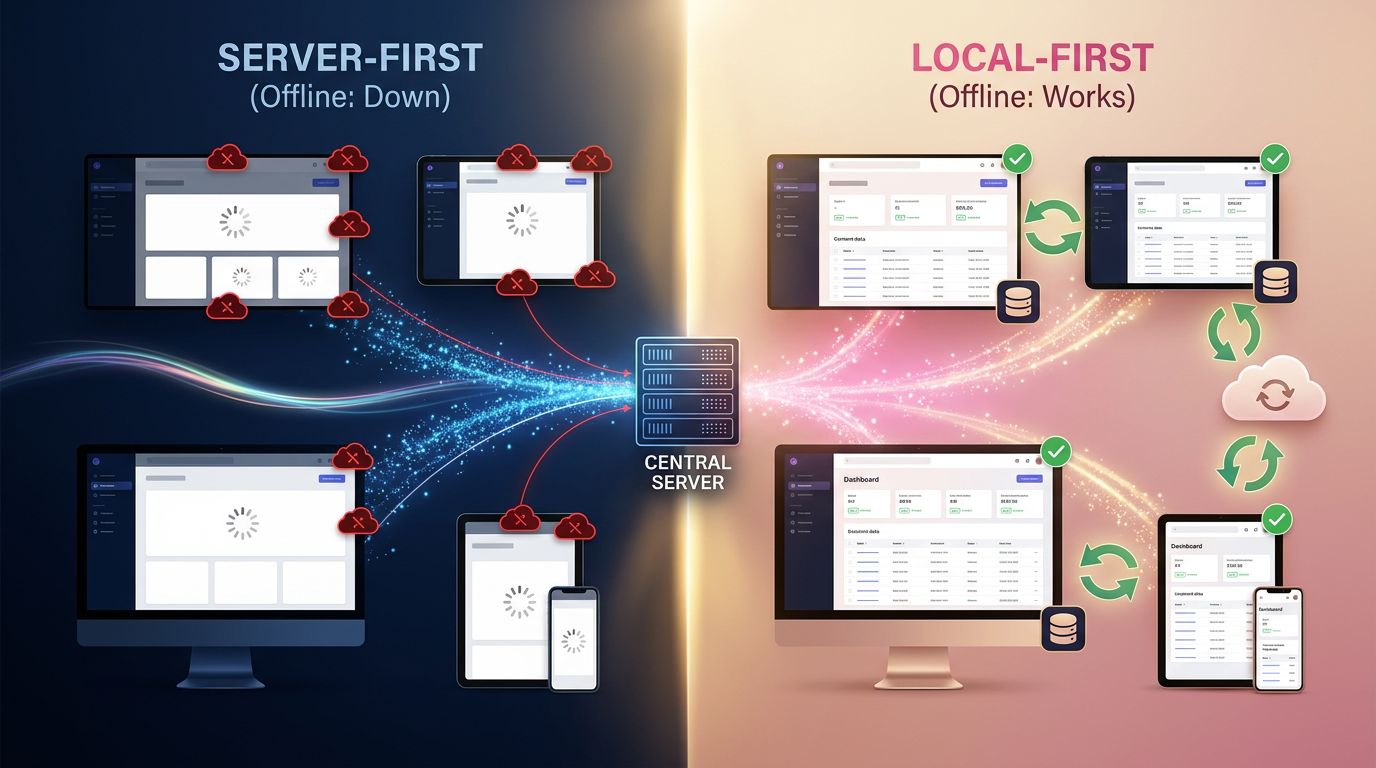
The concrete result for a user: the application responds instantly, even without a connection. Modifications are saved locally, then synchronised as soon as the network returns. Zero data loss. Zero artificial waiting.
For an SME deploying a field tool to its teams, this is the difference between a tool people use and a tool people work around. This is precisely the kind of trade-off we address right from the scoping phase of a website or web application project, before even choosing a technology.
Why this topic matters now, and what AI has changed
Here is where it gets interesting.
Over the past two years, AI tools have dramatically accelerated the speed of interface production. Generating a React component, producing a design system, prototyping an app in a few hours — it’s now possible. We’ve done it. We continue to do it at GDM-Pixel, and we make no secret of it.
But this acceleration has created a dangerous blind spot.
When you generate fast, you often generate interfaces optimised for ideal conditions. Stable connection, patient user, clean data, linear use case. AI produces what it has learned — and it has mostly learned from examples that work well, not edge cases.
The real risk is not that AI will replace the designer or developer. It’s that AI normalises functional mediocrity by making it aesthetically acceptable.
A beautiful interface that crashes when the network falters is an interface that has failed its mission.
“Design is not just what it looks like and feels like. Design is how it works.” — Steve Jobs
This quote has never been more relevant than today. Because AI excels at producing things that seem to work. Human craftsmanship is about producing things that actually work, under real conditions of use.
UX strategy as a safeguard against AI commoditisation
UX — user experience — is often reduced to its visual dimension. Beautiful colours, good typography, polished animations. That is necessary, but it is only the tip of the iceberg.
A true UX strategy is a research and decision-making process that answers questions AI does not spontaneously ask:
- Under what physical conditions will the user use this tool?
- What is their stress level at the moment of interaction?
- What happens if a step fails? Is it recoverable?
- How long can they wait before abandoning?
These questions are not abstract. They define real technical constraints. And that is where local-first and UX converge — a convergence we detail in our article on the engineering behind bespoke web interfaces.

Let’s take a concrete example from our practice. We worked with a local delivery company on the redesign of their route management tool. Drivers used the application from their phones, on the move, often in areas of poor network coverage.
The first version — generated quickly with a modern stack — was functional under normal conditions. It crashed as soon as the signal dropped. Drivers lost their delivery notes. Customer service was overwhelmed.
The redesign imposed three structural decisions:
Decision 1 — Local-first architecture. All route data is downloaded at the start of the day. Modifications are stored locally and synchronised at each reconnection.
Decision 2 — Explicit degraded interface. When offline mode activates, the interface signals it clearly without blocking the user. They keep working; the app catches up afterwards.
Decision 3 — One-handed interactions, broad gestures. Drivers have their hands full. Every critical action is accessible with the thumb, without requiring precise gestures.
Result: abandonment rate reduced by 60%. Customer service calls divided by 3. And drivers who no longer call the office to report that “the app isn’t working”.
This is not magic. It is rigorous UX applied to real constraints, coupled with an architecture that does not assume ideal conditions.
What this changes in the way you build a web project
Integrating these two dimensions from the outset deeply changes how a project is scoped.
The question is no longer “what technology for this project?” but “under what real conditions will this tool be used?”
This shift in perspective has practical consequences for every phase of the project.
During the discovery phase
Before opening Figma or generating a single component, we map usage conditions. Who are the users? Where are they physically? What is their level of technical proficiency? Do they have a reliable connection? This research phase — even brief, even lightweight — prevents costly redesigns down the line.
During the architecture phase
We explicitly decide on the data model: what absolutely must work offline? What can wait for a connection? This decision structures everything else — the framework choice, state management, the caching strategy.
During the design phase
Every interface state must be designed: normal state, loading state, error state, offline state. This is not a detail — it is what the user sees when something does not go as expected. And it is often where an application wins or loses the trust of its users.
During the testing phase
We test under degraded conditions. Network throttling, simulated outages, reconnections. If the application does not pass these tests, it is not ready for the field.
Three concrete decisions to transform your approach
No exhaustive list. Three decisions that genuinely change things.

First decision: audit your real usage conditions, not ideal ones.
Before your next project, spend two hours with real users in their actual environment. Not in a meeting room with a fibre connection. In the field, with their constraints. What you discover will likely shift your technical priorities.
Second decision: design error states before normal states.
It’s counterintuitive. But an interface that handles errors well is more robust than one that shines under perfect conditions. Start with “what happens if this fails?” and build from there.
Third decision: use AI to accelerate, not to decide.
AI generates quickly. It does not make good decisions about functional constraints. Use it to produce components, variants, copy — but keep control over architecture decisions and UX choices. That is where human value is irreplaceable, a point we explore in depth in our reflection on design in the AI era between transparency and accessibility.
“Technology must serve the use case, not the other way around. A robust application is one that assumes nothing about the user’s conditions.” — A principle we have applied at GDM-Pixel since our process overhaul in 2023.
The cost of not thinking about it
The question we often avoid: how much does an application that doesn’t work in real conditions cost?
Not in terms of technical redesign — everyone sees that. But in terms of lost trust, circumvented business processes, failed adoption. An application that field teams don’t use because it “crashes too often” — that is a zero-ROI investment, regardless of code quality under ideal conditions.
Across France, SMEs investing in digital tools expect a measurable return. Not a beautiful dashboard that only works in the office.
Local-first architecture and rigorous UX strategy are not extra costs. They are insurance against failure in use.
Going further
If your project involves field users, areas of poor connectivity, or critical business processes — the question of local-first architecture deserves to be raised right from the scoping phase, not halfway through.
At GDM-Pixel, we have integrated this thinking into our discovery process. It’s not systematic — some projects don’t need it. But when the need is there, failing to address it upfront always costs more than dealing with it from the start.
Do you have a web project or a business application to build? Let’s talk about your real constraints before we talk technology. Thirty minutes of honest scoping is worth more than three months of redesign.
And if you want to explore the local-first topic further, the resources at localfirstweb.com are a good starting point — the community documents the patterns and tools that actually make this approach work in production.
 Social networks
 Analyze with AI