+33-9-7266-3068
 contact@gdm-pixel.fr








 TL;DR - Key Takeaways at a Glance
The web has limits. And they show.
Have you ever asked your developer to build an ultra-interactive interface — a dashboard with smooth animations, real-time data visualisations, a truly immersive user experience — only to hear: “It’s technically complex, the DOM has constraints”?
That’s not an excuse. It’s a technical reality that most web agencies work around rather than solve. The result: sluggish interfaces, janky animations, and ambitious projects that end up stripped back.
HTML-in-Canvas changes the game. Not as a buzzword. As a genuine architectural solution.
What the DOM really is — and why it slows down your complex projects
The DOM (Document Object Model) is the tree structure your browser builds to represent your web page. Every HTML element — a button, a heading, an image — is a node in that tree. The browser has to manage all of it: positions, styles, interactions, accessibility.
For a showcase site or a blog, it works perfectly. For an e-commerce store with 5,000 products, it starts to strain. For a visualisation interface with 10,000 data points animated in real time? The DOM breaks down. This is exactly the kind of trade-off we settle on a case-by-case basis in our custom website creation projects, where the technical architecture is determined by real constraints, not trends.
Here’s why. Every DOM modification triggers what’s called a reflow and a repaint — the browser recalculates positions and redraws the affected elements. On a rich interface with dozens of elements moving simultaneously, these recalculations pile up and create visible bottlenecks. The 60 frames per second your users expect drops to 20 or even less.
“The DOM is excellent for what it was designed for: structured, interactive documents. But it is not a graphical rendering engine.” — A truth every front-end developer knows, but few agencies communicate to their clients.
The HTML5 Canvas works differently. It’s a bitmap drawing surface where you draw pixel by pixel via JavaScript. The browser manages no structure — it executes rendering instructions. The result: unmatched performance for anything graphical, animated, or massively interactive.

HTML-in-Canvas: the proposition that changes the rules
The idea behind HTML-in-Canvas is to combine both worlds. In practice: render HTML content — with all its semantic richness, CSS styles, and components — directly inside a <canvas> element.
How? Via a technique that uses foreign SVGs as a bridge. By encapsulating HTML inside an SVG <foreignObject> element and then converting that SVG into a drawable image on the Canvas, you get a faithful HTML rendering within a Canvas context.
// Simplified diagram of the principle
const canvas = document.getElementById('myCanvas');
const ctx = canvas.getContext('2d');

const svgBlob = new Blob([`
  <svg xmlns="http://www.w3.org/2000/svg" width="400" height="300">
    <foreignObject width="100%" height="100%">
      <div xmlns="http://www.w3.org/1999/xhtml">
        <!-- Your full HTML here -->
        <h2 style="color: #333;">Title rendered in Canvas</h2>
        <p>HTML content with CSS styles</p>
      </div>
    </foreignObject>
  </svg>
`], { type: 'image/svg+xml' });

const img = new Image();
img.src = URL.createObjectURL(svgBlob);
img.onload = () => ctx.drawImage(img, 0, 0);
This isn’t magic. It’s well-considered technical plumbing.
Libraries like html2canvas or dom-to-image exploit similar principles to generate faithful captures of HTML elements. Fabric.js and Konva.js push the concept even further by offering complete object systems on Canvas with HTML content support.
What it concretely unlocks for your projects
Let’s talk real applications. No theory — use cases that justify the investment.
High-performance analytical dashboards
A logistics client came to us for an internal dashboard: 15 real-time charts, indicators updated every second, several hundred rows of data. With a classic DOM approach (React + standard chart libraries), rendering was choppy as soon as several metrics updated simultaneously.
By switching the chart rendering to Canvas while keeping HTML for controls and navigation, we cut rendering time by 4. Animations became smooth. The user experience finally lived up to expectations.
Visual editors and creation tools
Want to build an online poster creation tool? A business card editor? A product configurator with real-time preview?
HTML-in-Canvas lets you manipulate rich elements — styled text, images, shapes — as objects in a graphical space, while retaining the ability to export the result as a high-resolution image. This is exactly what tools like Canva or Figma do in their web implementation — the kind of challenge we address in our approach to custom web interfaces and UX engineering.
Client-side dynamic image generation
A concrete use case for e-commerce merchants: automatically generating personalised product visuals (with the customer’s name, a chosen colour, custom text) directly in the browser, without going through a server. HTML-in-Canvas makes this possible with acceptable performance even on mobile.

Immersive experiences and unconventional interfaces
Classic web interfaces are rectangular, stacked, predictable. Canvas frees you from the grid constraint. Menus that animate following the cursor, page transitions that distort content, elements that react to physics — all of this becomes achievable without resorting to WebGL (which has a far steeper learning curve).
The real constraints — because we don’t sell dreams
HTML-in-Canvas has limits. Ignoring them would do you a disservice.
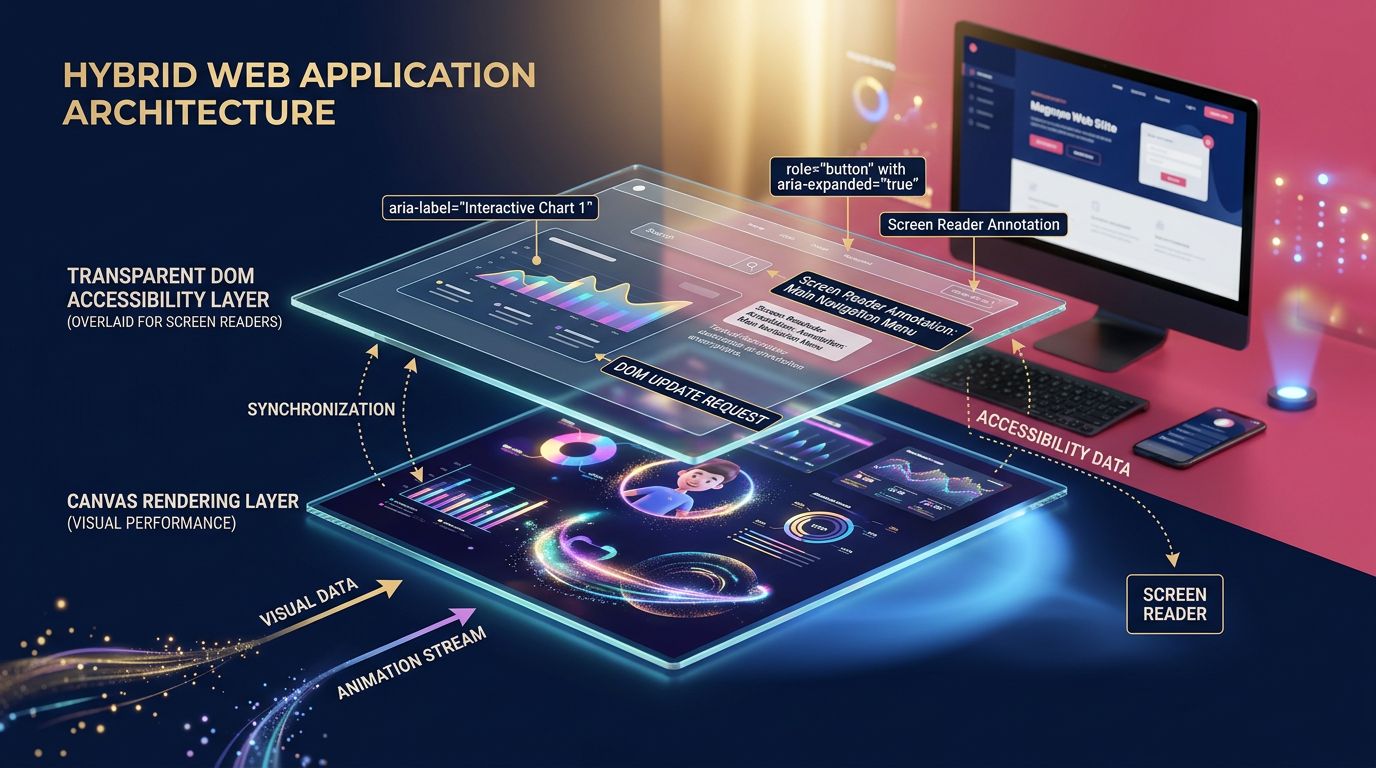
Accessibility is the weak point. Content rendered inside a Canvas is invisible to screen readers and assistive technologies. If your interface needs to be accessible (and it should be, especially since the European digital accessibility directive), you’ll need to maintain a parallel accessible DOM layer — which complicates the architecture.
Text cannot be selected. Everything rendered in Canvas is an image. Copy-pasting text? Not natively possible. For some use cases (content editors, reading interfaces), this is a deal-breaker.
Debugging is more complex. Chrome and Firefox DevTools are excellent for inspecting the DOM. With Canvas, you see an opaque surface. Identifying why an element isn’t displaying correctly requires more tooling and experience.
Performance isn’t automatic. Canvas is fast when used correctly. Poorly optimised (unnecessarily recreating paths, not using requestAnimationFrame, ignoring dirty regions), it can be worse than a well-structured DOM.
“Canvas is not a miracle solution. It’s a powerful tool that requires specific expertise. The right architectural choice always depends on the use case.” — What we tell our clients before starting any project.
How to evaluate whether HTML-in-Canvas is relevant for your project
Three simple questions to guide the decision:
1. Do you have measurable graphical performance constraints? If your interface needs to display and animate several hundred elements simultaneously, Canvas seriously deserves consideration. Otherwise, the DOM probably suffices.
2. Is image export part of the feature set? If so, Canvas considerably simplifies implementation. Generating an image from the DOM requires technical contortions. From Canvas, it’s a single line of code: canvas.toDataURL('image/png').
3. Does your audience include users with accessibility needs? If that’s an absolute priority, a hybrid architecture (Canvas for rendering, DOM for accessibility) is necessary — with an additional development cost to factor in. We detail this balance in our analysis of immersive and accessible websites, where graphical performance and compliance don’t necessarily conflict.
What we take away for your web projects
Three actionable points if you’re considering complex interfaces:
Start by measuring the problem. Before choosing Canvas, profile your current application. Chrome DevTools > Performance tab. If you see frames exceeding 16ms (the 60fps threshold), you have a real rendering problem to solve. Otherwise, DOM optimisation will suffice.
Think hybrid rather than all-or-nothing. The best implementations mix DOM and Canvas depending on the interface zone. Navigation, forms, editorial text → DOM. Charts, complex animations, visual editors → Canvas. Hybrid architecture captures the advantages of both without their drawbacks.
Anticipate the maintenance cost. A well-designed Canvas with a clear architecture maintains correctly. A Canvas coded in haste becomes a nightmare. Invest in structure from the start — proven libraries (Fabric.js, Konva.js), component documentation, automated rendering tests.
The web evolves. So do your interfaces.
HTML-in-Canvas is not an emerging technology that will “revolutionise the web” in 5 years. It’s a mature technique, available today, that advanced technical teams are already using to build experiences that the DOM alone cannot deliver.
The real question isn’t “is this technology ready?” — it is. The question is: does your project justify the added complexity?
For a 5-page showcase site, no. For a product configurator, a real-time analytics dashboard, or an online visual editor, absolutely.
At GDM-Pixel, we make this architectural choice on a case-by-case basis, based on the real constraints of the project — not on current trends. If you have a complex interface project and performance or graphical capabilities are a concern, we can look together at what HTML-in-Canvas would concretely change for your stack.
Get in touch — a 30-minute conversation is usually enough to evaluate whether the approach is relevant for your case.
 Social networks
 Analyze with AI