+33-9-7266-3068
 contact@gdm-pixel.fr








 TL;DR - Key Takeaways at a Glance
The problem nobody sees coming
A client called us a few months ago. He had just integrated an AI tool into his web production workflow. The result? The AI was generating code. A lot of code. Fast. But none of the produced components matched his existing design system. Approximate colors, inconsistent spacing, random typography. Everything had to be redone by hand.
How many hours lost correcting what the AI had “created”?
This scenario is becoming more and more common. Teams adopt AI tools to accelerate their production — Copilot, Cursor, Claude Code, v0.dev — without having prepared the ground. And their design system, designed at a time when a developer read every line, becomes a burden. We explored this subject from a technical angle in our article on the AI-ready design system and the CSS centering your integrators still do by hand.
An unstructured design system with AI in the loop is a brake disguised as an accelerator.
Here’s how to avoid that. Concretely, with actions applicable today.
Why your current design system is no longer sufficient
Most design systems were built for humans. A developer opens Figma, reads the docs, understands the context, makes choices. They interpret. They adapt.
AI doesn’t do that.
A language model or code generation tool works from tokens, patterns, structures. It needs explicit, unambiguous, systematic instructions. When your design system says “use brand colors,” AI doesn’t know what that means without the exact hex values, usage contexts, and combination rules.
What we see concretely with our clients: visually rich design systems in Figma, but nearly unusable by AI because they’re documented in natural language, without machine-readable structure.
Beautiful documentation is worthless if it’s not readable by a machine.
Three recurring problems:
- Design tokens (colors, spacings, typographies) exist in Figma but aren’t exported in a structured format (JSON, CSS custom properties, W3C design tokens)
- Composition rules are implicit — they live in the designers’ heads, not in the documentation
- Components don’t have consistent naming between Figma, code, and documentation

The four pillars of an AI-ready design system
Pillar 1: design tokens as the single source of truth
If you only do one thing after reading this article, it’s this.
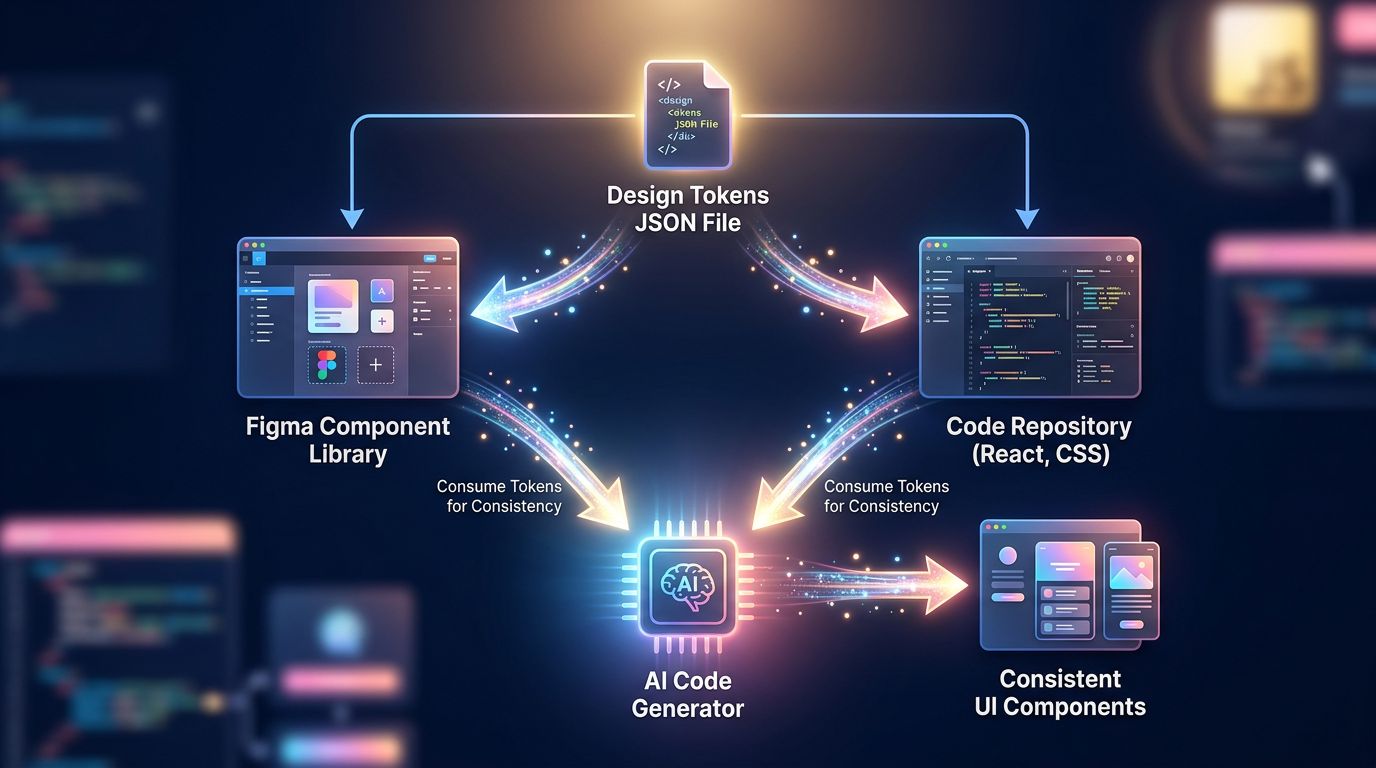
Design tokens are the translation of your visual decisions into named, structured values. Not #1A73E8, but color.brand.primary. Not 16px, but spacing.md. This semantic nomenclature allows AI to understand not just the value, but the intention behind it — exactly what transforms a visual identity into a system exploitable by the machine.
The standard that’s currently establishing itself is the W3C Design Tokens format. It structures your tokens in JSON with metadata: type, value, description, usage context. Tools like Style Dictionary or Tokens Studio for Figma allow you to synchronize these tokens between your design file and your codebase.
Concrete result: when you give Claude Code or Cursor access to your token file, it generates code that automatically respects your brand guidelines. No more approximate colors. No more invented spacing.
“Tokens aren’t an additional technical constraint. They’re the translation of your visual identity into a language that AI can read.” — Daily practice at GDM-Pixel for 18 months.
Pillar 2: consistent nomenclature across all tools
AI works by pattern matching. If your component is called CardProduit in Figma, product-card in your CSS and ProductTile in your React, you have three distinct entities for the AI. It won’t make the connection.
The rule is simple: one component, one name. Everywhere.
Choose a convention — BEM, camelCase, kebab-case — and apply it systematically in Figma, in your code, in your documentation. This consistency allows AI tools to navigate between contexts without losing the thread.
On our Astro + Tailwind projects, we use kebab-case nomenclature everywhere. When Claude Code generates a component, it immediately finds its correspondence in the design system. Time saved: real, measurable, immediate.
Pillar 3: document the rules, not just the components
A classic design system shows what. An AI-ready design system explains why and when.
The difference? Your documentation must include:
- Usage rules (this component is only used for primary actions)
- Constraints (never combine this background with this text for accessibility reasons)
- Allowed and forbidden variants
- Application contexts (mobile, desktop, dark mode)
This information, structured in Markdown or JSON, becomes instructions directly injectable into an AI prompt. We work with context files that we pass to Claude Code at the start of a session. Result: the model knows our constraints before writing the first line.

Pillar 4: version and maintain like code
A design system that isn’t versioned is a design system that drifts.
With AI in the loop, this problem amplifies. If your tokens change but your AI is still working with the old version, you produce inconsistencies at industrial speed. AI accelerates everything — including errors.
The solution: your design system must live in a Git repository, with numbered releases, a clear changelog, and integration into your CI/CD pipeline. When a color changes in your brand guidelines, the change propagates automatically — in the code, in the documentation, and in the contexts you provide to your AI tools.
What this concretely changes in production
Let me give you a field example.
On the Nova Mind project — our own SaaS — we structured our design system with W3C tokens, a unified Figma/Astro nomenclature, and Markdown context files per component type. When we open a Claude Code session to develop a new screen, we inject these files as context.
The model generates components that respect our palette, our spacing, our typographic rules — without us having to repeat them with every prompt. We correct the business logic, not the style. That’s the right use of AI: it executes the rules, you design the strategy.
Before structuring: 40 to 60% of revision time was spent on visual consistency. After: less than 10%.
This isn’t an estimate. It’s measured on our last delivered projects.
“AI doesn’t replace your design system. It reveals its flaws — the ones you didn’t see because your developers were compensating for them intuitively.”
Where to start if you’re starting from scratch (or almost)
You have an existing but unstructured design system? Here’s a realistic path, without rebuilding everything at once.
Step 1 — Audit your existing tokens. Inventory all color, spacing, and typography values used in your codebase. Tools like Style Dictionary or a simple search in your CSS give you an overview in a few hours.
Step 2 — Name and structure. Transform your raw values into semantic tokens. #2D3748 becomes color.neutral.800. Export to JSON. Synchronize with Figma if you use it.
Step 3 — Write usage rules in Markdown. For each main component, a .md file with: description, use cases, allowed variants, accessibility constraints. Simple, direct, machine-readable.
Step 4 — Integrate into your AI workflow. Create a /context folder in your project with your tokens and rules. Reference them in your prompts or configure them as persistent context in your AI tool.
Step 5 — Version. Git + changelog. From day one.
Mistakes to absolutely avoid
We’ve made a few. Might as well save you the same pain.
Wanting to structure everything at once. An AI-ready design system is built iteratively. Start with color and spacing tokens — that’s where AI makes the most errors. The rest comes after.
Neglecting documentation of exceptions. Your AI will apply the general rules to the letter. If you have undocumented exceptions, it doesn’t know about them. Document edge cases as carefully as standard cases.
Separating design and development responsibility. An AI-ready design system is a joint project. If the designer evolves tokens in Figma without synchronizing with the code, you lose the consistency you spent time building. Shared process, shared tool, shared responsibility.
The question you should be asking yourself now
Your current design system — if you have one — is it documented in a way that an AI can read it and apply it without interpretation?
If the answer is no, or if you’re not sure, this is the right time to act. Not because AI is a trend. Because AI tools are already in web production workflows, and their effectiveness depends directly on the quality of the structure you provide them.
An unstructured design system with AI in the loop means double work. An AI-ready design system is a real productivity multiplier — the same invisible craftsmanship in code and UX that separates a good site from a site that performs.
At GDM-Pixel, we spent time structuring our own systems before integrating them into our AI workflows. We recovered that investment time from the second project onwards. And we continue to recover it with every delivery.
Want to structure your design system for AI, or audit your current web production workflow? Contact us — we give you an honest diagnosis, without selling you an unnecessary rebuild.
 Social networks
 Analyze with AI